CentOS on VMware: network interface does not start
Created an OVF file from a running CentOS 6.5 VM, then created a new VM from it. As a result, the network interface does not start at boot. Check:
eth2 exists but is inactive.
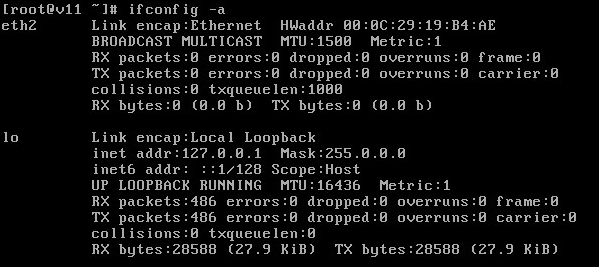
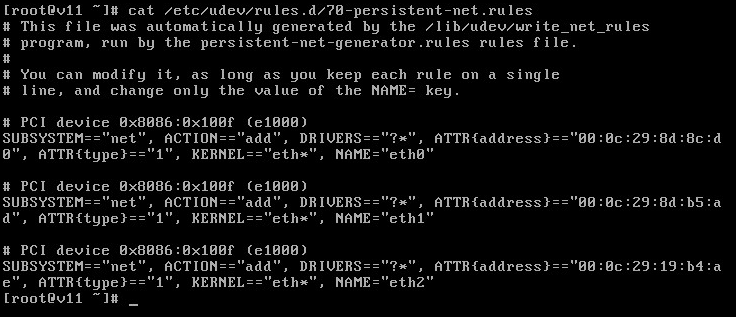
Check /etc/udev/rules.d/70-persistent-net.rules
Shut down the VM and recorded the eth0 MAC address. Entered it in the VM Ethernet card settings, but the VM would not start because the MAC was reserved. Set the MAC back to automatic, started the VM, deleted /etc/udev/rules.d/70-persistent-net.rules, and rebooted the VM. Check /etc/udev/rules.d/70-persistent-net.rules:
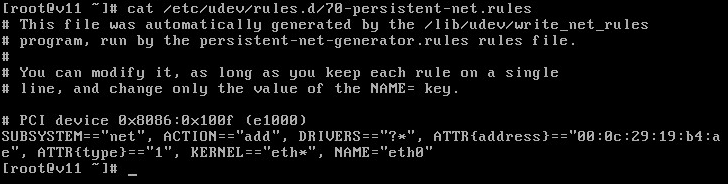
Delete the eth1 configuration file. Create a new one for eth0, update its HWADDR field, and restart the network service.
[root@v11 ~]# cat /etc/sysconfig/network-scripts/ifcfg-eth0
DEVICE=eth0
TYPE=Ethernet
ONBOOT=yes
NM_CONTROLLED=no
BOOTPROTO=none
HWADDR=00:0c:29:70:7c:c3
IPADDR=192.168.112.61
PREFIX=24
GATEWAY=192.168.112.1
DNS1=192.168.112.51
DEFROUTE=yes
IPV4_FAILURE_FATAL=yes
IPV6INIT=no
NAME="System eth0"
NETMASK=255.255.255.0
DNS2=192.168.112.52
USERCTL=no