Example of migrating a site to a VPS
Old server: physical server in a data center
MB: MSI H67MA-E45 (MS-7678) CPU: Intel Core i5-2400 CPU @ 3.10GHz RAM: 8 GB 4x2GB DBLT2GN568S HDD: WDC WD10EZEX-00ZF5A0 Ubuntu 12.04.5 nginx version: nginx/1.1.19 (fronted) Apache/2.2.22 (backend) MySQL 5.5.54 PHP 5.3.10e
Pagespeed Insights score: 32/100.
$ df -h
Filesystem      Size  Used Avail Use% Mounted on
/dev/sda1       908G  175G  705G  20% /
udev            3.9G  4.0K  3.9G   1% /dev
tmpfs           790M  292K  790M   1% /run
none            5.0M     0  5.0M   0% /run/lock
none            3.9G     0  3.9G   0% /run/shm

# Performance
$ hdparm -Tt /dev/sda1
/dev/sda1:
 Timing cached reads:   19828 MB in  1.99 seconds = 9958.25 MB/sec
 Timing buffered disk reads: 220 MB in  3.01 seconds =  73.14 MB/sec

/dev/sda1:
 Timing cached reads:   20682 MB in  1.99 seconds = 10390.82 MB/sec
 Timing buffered disk reads: 350 MB in  3.01 seconds = 116.47 MB/sec

/dev/sda1:
 Timing cached reads:   20558 MB in  1.99 seconds = 10328.10 MB/sec
 Timing buffered disk reads: 478 MB in  3.00 seconds = 159.09 MB/sec
New server: VPS (VMware) on arubacloud.com
CPU: 2 Core Intel® Xeon® E5-2650L v3 RAM: 4 GB HDD: 80 GB SSD Debian 8.3 Nginx 1.10.3 Php-fpm 5.6.30
$ df -h
Filesystem      Size  Used Avail Use% Mounted on
/dev/dm-0        77G   56G   19G  76% /
udev             10M     0   10M   0% /dev
tmpfs           794M  8.6M  785M   2% /run
tmpfs           2.0G     0  2.0G   0% /dev/shm
tmpfs           5.0M     0  5.0M   0% /run/lock
tmpfs           2.0G     0  2.0G   0% /sys/fs/cgroup
/dev/sda1       461M   33M  405M   8% /boot
# Performance
$ hdparm -Tt /dev/sda1
/dev/sda1:
 Timing cached reads:   12334 MB in  2.00 seconds = 6171.72 MB/sec
 Timing buffered disk reads: 476 MB in  0.78 seconds = 607.23 MB/sec
Images were optimized; Nginx Pagespeed was not installed. Pagespeed Insights score: 71
Notes
A custom CMS using Smarty 2.5/2.6 is in use.
Compiled Smarty templates are placed in web_root/class/compile without removing old resources. At migration time, the web server directory was 90 GB, including 60 GB of many small compiled files. Changed during migration: a separate root directory, web_root/compile/class, was allocated. This directory is excluded from backups and will probably be cleaned periodically.
Images are stored in web_root/media. When an image is requested at a unique size, it is resized and a separate file is created. This operation occurs only once.
#
$ ls -la media/news/638790*
-rw-r--r-- 1 1001 1003 57751 Nov 26  2015 media/news/638790.jpg
-rw-r--r-- 1 1001 1003 10140 Jan 24  2016 media/news/638790.thumb200xproportional.jpg

# Some have as many as five
$ ls -la media/news/705530*
-rw-r--r-- 1 1001 1003 41371 Dec  7 00:50 media/news/705530.jpg
-rw-r--r-- 1 1001 1003  5291 Dec  7 01:07 media/news/705530.thumb160x120cut.jpg
-rw-r--r-- 1 1001 1003  7002 Dec  7 00:50 media/news/705530.thumb200xproportional.jpg
-rw-r--r-- 1 1001 1003   999 Dec  7 00:50 media/news/705530.thumb31x.jpg
-rw-r--r-- 1 1001 1003  1420 Dec  7 00:51 media/news/705530.thumb50xproportional.jpg
Site directory size: 20 463 560 KB
MYSQL
Database size on disk: 8 251 347 842 bytes. Table count: 108. The tables use MyISAM and InnoDB. The largest table, Newsstatistics (MyISAM), is 3.3 GB and contains 59 601 086 records.
A full ZIP (-9) backup takes 36 minutes and is 18 GB.
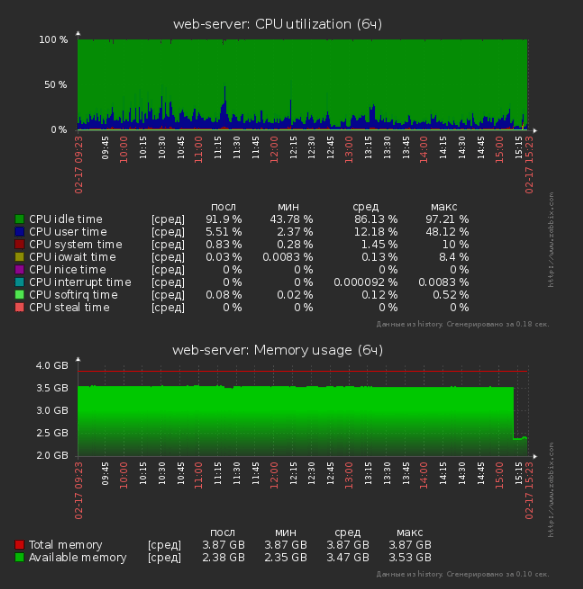
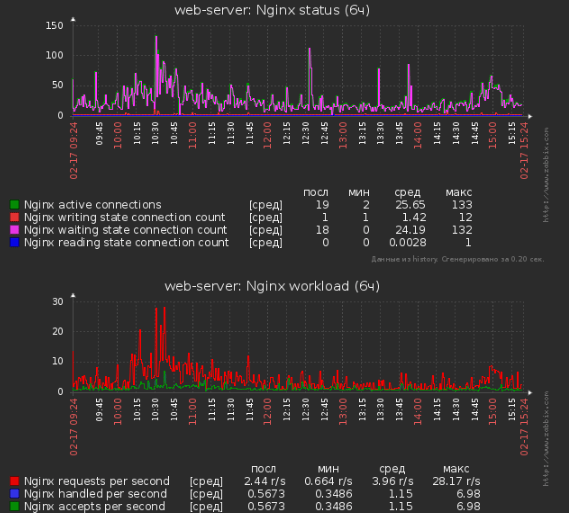
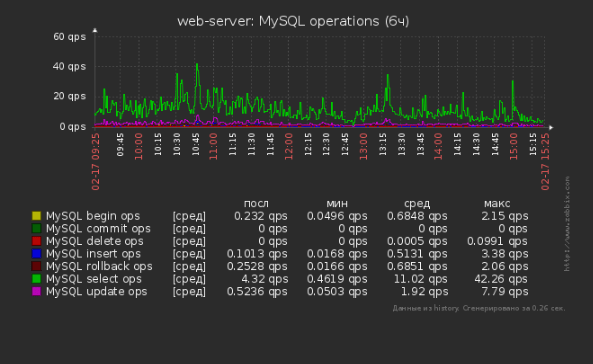
Performance during working hours on Friday: