Zabbix failed another network error
Background: Zabbix started periodically showing unavailability of 2 out of 61 hosts. It started overnight on Sunday. The frequency varied from 2 to 30 minutes.
Description: Zabbix server 3.2 on Debian 7.11. V01 - Windows. Zabbix agent 2.0.8 (revision 38015) V06 - Windows. Zabbix agent 2.0.8 (revision 38015)
All hosts are on the same ESXi hypervisor, in the same VLAN, in the same subnet.
It looks like this:
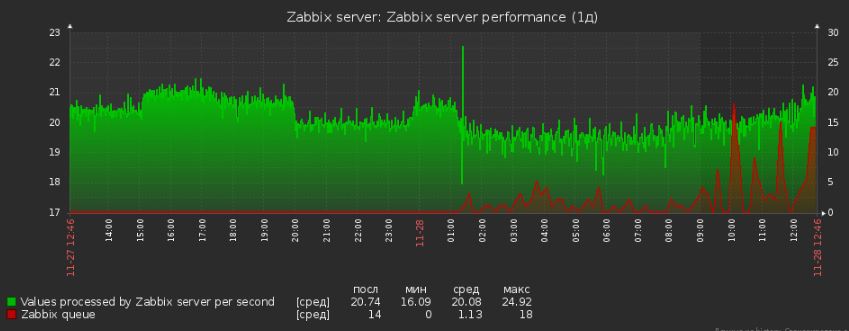
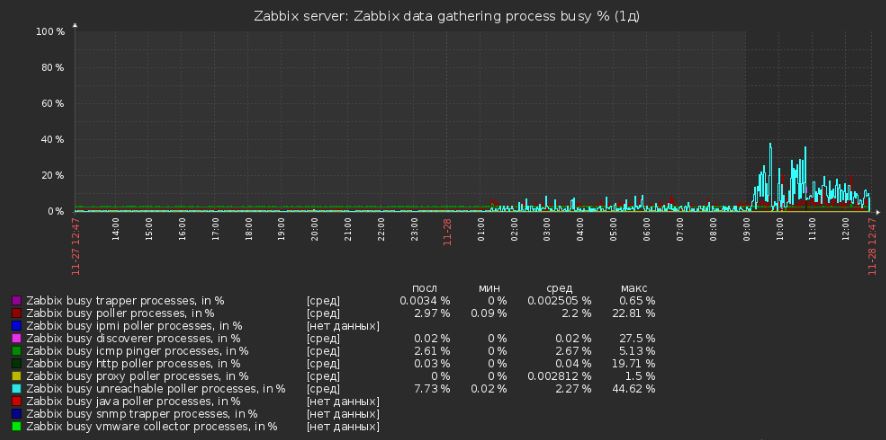
The hypervisor does not show Health Status. It reports "Unknown" for them. The Reset Sensors operation cannot be executed. The response was:
Call "HostHealthStatusSystem.ResetSystemHealthInfo" for object "healthStatusSystem" on ESXi "x1" failed
Checking the Zabbix server log, we see:
  3116:20161128:113431.461 Zabbix agent item "system.cpu.load[percpu,avg5]" on host "V01" failed: first network error, wait for 15 seconds
  3084:20161128:113454.189 Zabbix agent item "system.cpu.load[percpu,avg15]" on host "V06" failed: first network error, wait for 15 seconds
  3171:20161128:113509.131 resuming Zabbix agent checks on host "V06": connection restored
  3103:20161128:113513.451 Zabbix agent item "net.if.out[WAN Miniport (IP)]" on host "V06" failed: first network error, wait for 15 seconds
  3179:20161128:113516.109 temporarily disabling Zabbix agent checks on host "V01": host unavailable
  3181:20161128:113558.159 temporarily disabling Zabbix agent checks on host "V06": host unavailable
  3194:20161128:113616.142 enabling Zabbix agent checks on host "V01": host became available
  3180:20161128:113646.146 Zabbix agent item "system.uptime" on host "V01" failed: first network error, wait for 15 seconds
  3183:20161128:113700.193 enabling Zabbix agent checks on host "V06": host became available
  3119:20161128:113701.141 Zabbix agent item "net.if.out[]" on host "V01" failed: another network error, wait for 15 seconds
  3117:20161128:113704.182 Zabbix agent item "vfs.fs.size[C:,pfree]" on host "V01" failed: another network error, wait for 15 seconds
No actions were performed on the hosts before or at the start of the problem. The hosts had not been rebooted for 497 days.
During the problem: CPU load, network utilization of both the hosts and the hypervisor were minimal. No activity.
Analysis of network traffic between the clients and the Zabbix server yielded no results: everything was flowing, no delays:
# ping 192.168.112.56
PING 192.168.112.56 (192.168.112.56) 56(84) bytes of data.
64 bytes from 192.168.112.56: icmp_req=1 ttl=128 time=0.428 ms
64 bytes from 192.168.112.56: icmp_req=2 ttl=128 time=0.261 ms
64 bytes from 192.168.112.56: icmp_req=3 ttl=128 time=0.298 ms
64 bytes from 192.168.112.56: icmp_req=4 ttl=128 time=0.407 ms
Route between clients and server:
# traceroute 192.168.112.56
traceroute to 192.168.112.56 (192.168.112.56), 30 hops max, 60 byte packets
 1  v06.domain.local (192.168.112.56)  0.148 ms * *
Enabled Debug=4 on the Zabbix server to find the cause:
3743:20161128:100924.105 End of get_value_agent():NETWORK_ERROR
3743:20161128:100924.105 Item [V01:perf_counter[\234(_Total)\1404]] error: Get value from agent failed: cannot connect to [[192.168.112.51]:10050]: [4] Inte
rrupted system call
3743:20161128:100924.105 End of get_value():NETWORK_ERROR
Restarting Zabbix agents/Zabbix server yielded no results. As expected.
Updating the agent to Zabbix 3.2.0 (revision 62444) changed nothing. Setting Timeout=10 on the agent yielded no results.
Rebooting host V01 helped. The "failed: first network error" messages stopped appearing in the log for it.
Observed a delay from the Zabbix server. After the 3rd-4th command, a timeout occurs:
root@v11: # nc -v -z 192.168.112.56 10050
v06.domain.local [192.168.112.56] 10050 (zabbix-agent) open
root@v11: # nc -v -z 192.168.112.56 10050
v06.domain.local [192.168.112.56] 10050 (zabbix-agent) : Connection timed out
The same command from a neighboring server (FreeBSD 10.3) does not hit a timeout, no matter how many times it is run:
Connection to 192.168.112.56 10050 port [tcp/*] succeeded!
root@v14: # nc -v -z 192.168.112.56 10050
Disabling/enabling the network interface on host 192.168.112.56 had no effect.
Rebooted V06 (192.168.112.56) - the problem was resolved.
The root cause was not found.